Compose your Turborepo’s Storybooks and deploy them to Vercel
TLDR; Show me the repo
Here is the starter repo.
What are we going to do?
We will use the basic Turborepo project generated by the cli, feel free to adapt to your needs.
- 📂 apps
	- 📂 docs <- This is going to be used as the main storybook project
	- 📂 web <- our web app
- 📂 packages
	- 📂 ui <- the design system
- 📄 turbo.json
Each project (docs, web and ui) is going to have its own Storybook instance and 3 package.json scripts, storybook:dev, storybook:build and storybook:move.
The docs project will be our primary Storybook instance and reference all the other ones.
How does it work
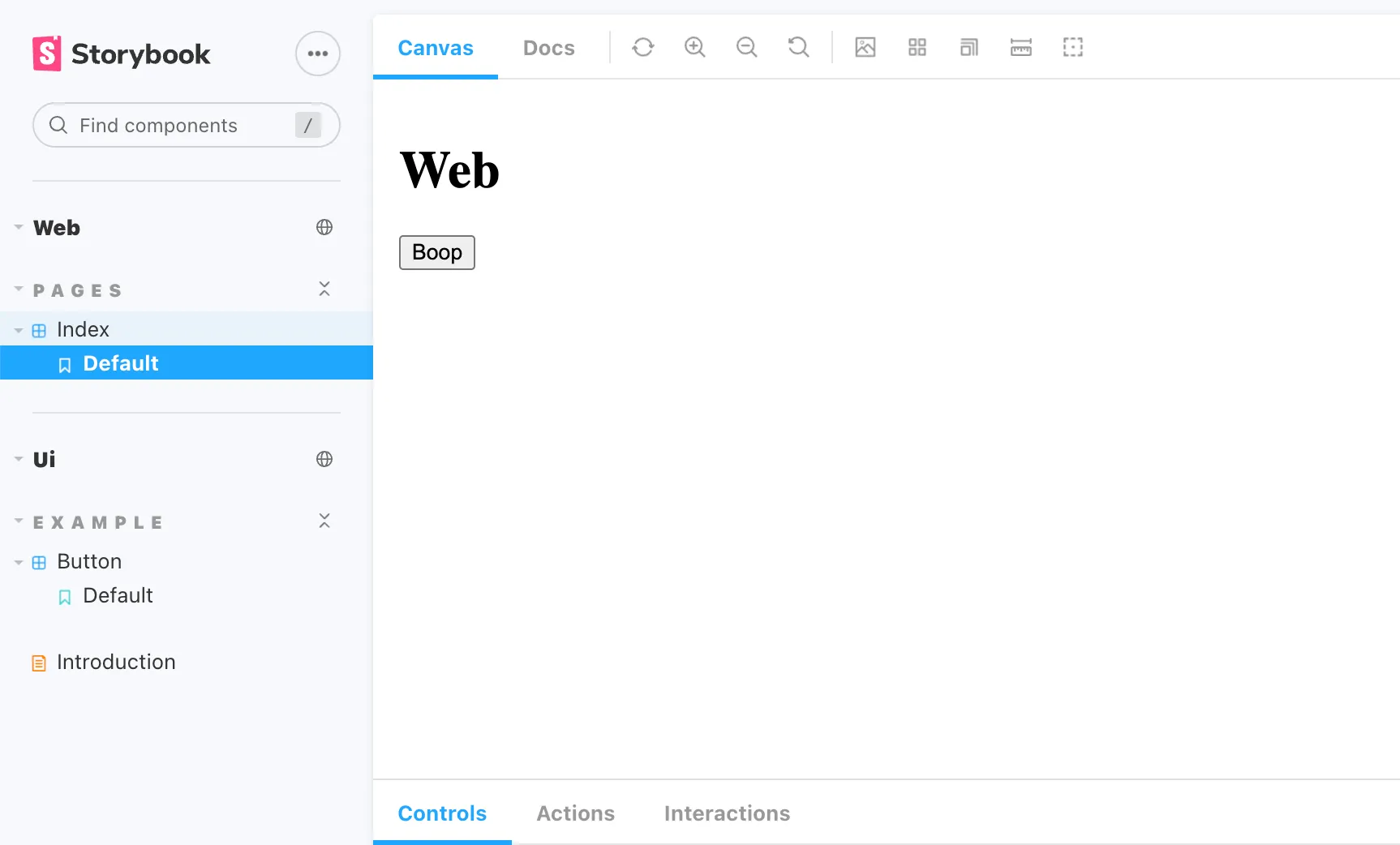
Storybook has a feature named “Storybook Composition”.
This allows you to create a main Storybook instance and link other published Storybooks.
Then each can have its config, add-ons, repo, or even CI pipeline or dev team while having a single entry point for all of them after publishing.
So how to use this feature when you have your web app, docs and design system in a Turborepo monorepo?
Another way to use this feature is to reference other locally generated Storybooks as “refs” instead of absolute web URLs.
Then the main Storybook instance will automatically use the generated stories.json file from every ref to populate the interface.
The trick here is to build all the Storybooks projects in a folder accessible by Vercel during deployment.
Adding storybook and package.json scripts
Add a storybook instance and the script commands to each project (apps/docs, apps/web, packages/ui)
Ex for web:
cd apps/webnpx storybook initTo generate the needed stories.json file at build time, we have to activate the storyStoreV7 feature in all our .storybook/main.js files:
module.exports = {
	features: {
		storyStoreV7: true,
	},
}
Then add the following scripts commands to each workspace’s package.json file:
storybook:dev will be used for our local development
storybook:build will trigger the build.
storybook:move will move the generated statics to the right folder before publishing on Vercel
{
	// ...
	"scripts": {
		// ...
		"storybook:dev": "start-storybook -p 6006",
		"storybook:build": "build-storybook --quiet",
		"storybook:move": "mv storybook-static ../../storybook-static"
	}
}
{
// ...
"scripts": {
// ...
"storybook:dev": "start-storybook -p 6007",
"storybook:build": "build-storybook --quiet",
"storybook:move": "mv storybook-static ../../storybook-static/web"
}
}{
// ...
"scripts": {
// ...
"storybook:dev": "start-storybook -p 6008",
"storybook:build": "build-storybook --quiet",
"storybook:move": "mv storybook-static ../../storybook-static/ui"
}
}Setting up the main Storybook
module.exports = {
	stories: ['../**/*.stories.mdx', '../**/*.stories.@(js|jsx|ts|tsx)'],
	refs: [
		{
			title: 'Web',
			url: 'web/',
			url:
				process.env.NODE_ENV === 'development'
					? 'http://localhost:6007/'
					: 'web/',
		},
		{
			title: 'Ui',
			url: 'ui/',
			url:
				process.env.NODE_ENV === 'development'
					? 'http://localhost:6008/'
					: 'ui/',
		},
	],
	// ...
}
During development, each ref will listen to the dedicated localhost servers, after the build, it will target the web and ui relative folders to search for the stories.json files.
Update the turbo.json file and root package.json
{
	"$schema": "https://turbo.build/schema.json",
	"pipeline": {
		"build": {
			"dependsOn": ["^build"],
			"outputs": ["dist/**", ".next/**"]
		},
		"lint": {
			"outputs": []
		},
		"dev": {
			"cache": false
		},
		"storybook:dev": {
			"cache": false
		},
		"storybook:build": {
			"outputs": ["storybook-static/**"]
		},
		"storybook:move": {
			"cache": false
		}
	}
}
{
// ...
"scripts": {
// ...
"storybook:dev": "turbo run storybook:dev --parallel",
"storybook:build": "turbo run storybook:build --parallel",
"storybook:move": "turbo run storybook:move --filter=docs && turbo run storybook:move --filter=!docs"
// ...
}
}Dev environment
Now by doing yarn storybook:dev you will start all the Storybooks (each on a specific port), and by navigating to localhost:6006 you will see your primary instance that combined all the others.
To start only one instance, launch yarn storybook:dev --filter=web (“web” being the name of your workspace)
More on workspace filtering in Turborepo here.
Build
To build our Storybooks, we will use the yarn storybook:build command.
The builds will be started in parallel, or the resulting statics will be retrieved from the cache if no changes have been found (more on Turborepo caching).
Publishing to Vercel
For Vercel to publish our generated statics, we will have to move them to the same directory.
Vercel Build config
Create your Vercel project, link your GitHub repo and setup the build config like so.
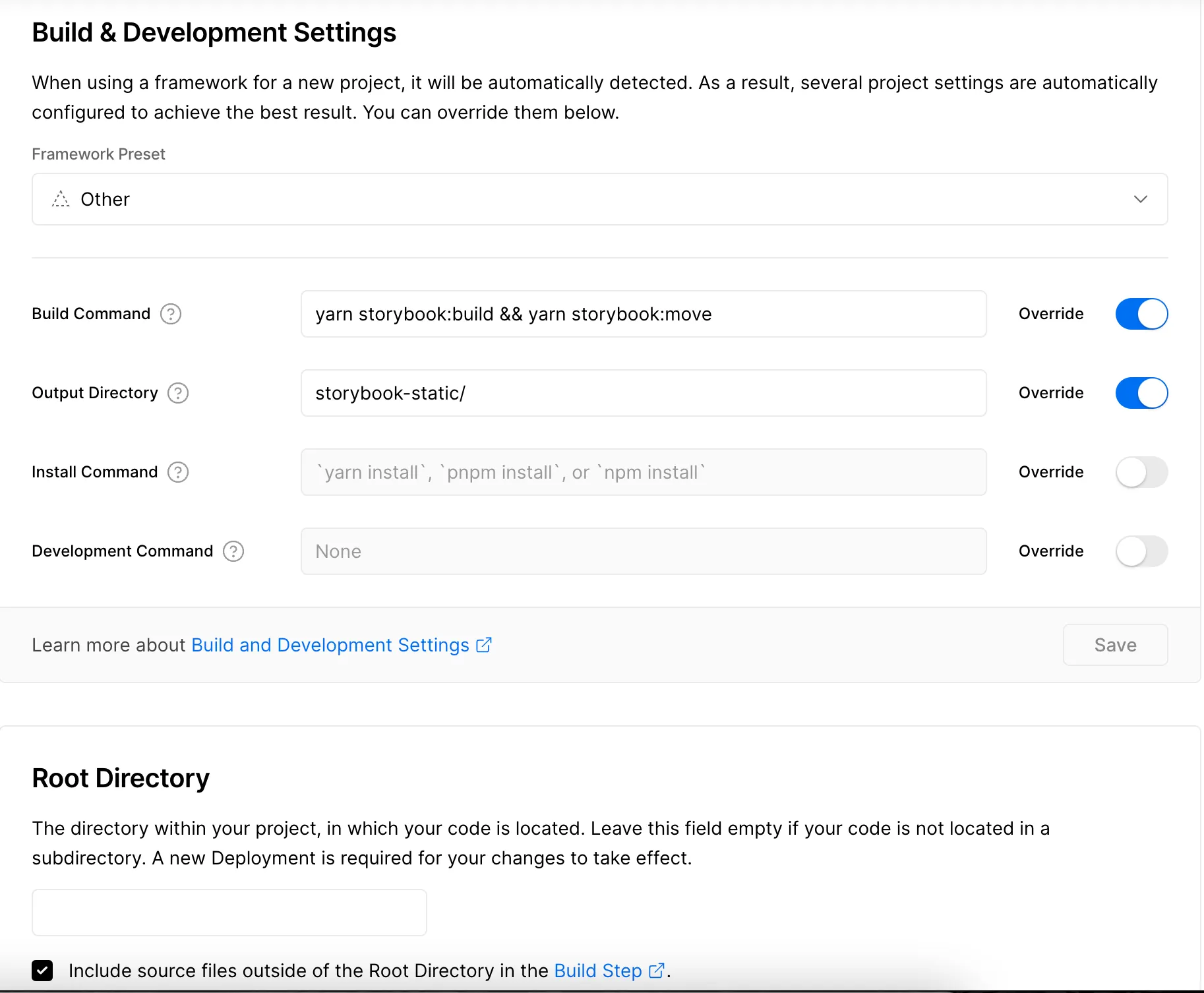
The yarn storybook:build && yarn storybook:move command will build our Storybooks as seen earlier, and then move the generated statics to the appropriate directory (output directory).
Details on our storybook:move command in our root package.json:
turbo run storybook:move --filter=docs && turbo run storybook:move --filter=!docs
To avoid moving web and ui before docs and risking being replaced, we launch turbo run storybook:move --filter=docs to include only the docs workspace and then turbo run storybook:move --filter=!docs to trigger the move on all the workspace except docs.
After pnpm storybook:build, we have:
- 📂 apps
	- 📂 docs
		- 📂 storybook-static
	- 📂 web
		- 📂 storybook-static
- 📂 packages
	- 📂 ui
		- 📂 storybook-static
After yarn storybook:move we have:
- 📂 storybook-static (statics of apps/docs)
	- 📂 web
	- 📂 ui
Result
Congratulations, you now have published your composed Storybook.